Create with Cloud
Basic, Plus, and Pro: plans and credits
Compare PlayDrop subscriptions, monthly and weekly plan credits, task prices, spending order, concurrent tasks, and game and storage limits.
Create a game Hollow Havoc@mnouz
Choose how you create
Built-in PlayDrop Studio uses credits for creation and updates. You can earn credits without paying in Quests; claim the rewards shown for your account and see what each task costs in Studio. A game may need several tasks. On Basic, each Studio game gets 10 updates; only successful ones count, not the first build, failed updates or updates made while Plus or Pro is active. The count stays with the game and does not reset; after 10, keep updating with Plus or Pro.
Use PlayDrop Connector to make a game in ChatGPT, Claude, Codex or another supported AI app, then upload, publish and update it without spending PlayDrop Credits. Basic includes 10 game slots and 1 GB of storage. Your AI app’s own plan and usage limits apply. Games that call PlayDrop’s AI services can still spend the creator’s credits.
Choose the plan you need
All three plans support Cloud creation and the daily gift shown for your account in Quests. The plans differ in credits, storage and how many tasks can run at once.
- Basic: $0; daily credits; 1 concurrent task; 10 games; 10 Studio updates per game; 1 GB storage.
- Plus: $19.99 USD/month; 4,000 credits every month plus 1,000 every week; 5 concurrent tasks; 100 games; 10 GB storage.
- Pro: $99.99 USD/month; 24,000 credits every month plus 6,000 every week; 10 concurrent tasks; 1,000 games; 100 GB storage.
Paid plans are billed monthly and renew automatically. You can cancel at any time. If a renewal payment fails, you keep the plan for 3 days.
Check Quests for the price and purchase terms presented to your account; those prices are authoritative. Start with Basic if you are trying your first idea; choose a larger plan when your actual creation activity needs it.
Plan Credits
At the start of every paid month, Plus adds 4,000 plan credits and Pro adds 24,000. Every Friday at 17:00 New York time, Plus adds 1,000 and Pro adds 6,000. Unused plan credits carry over up to 8,000 on Plus or 48,000 on Pro; additions stop at that cap. Plan credits are removed when the plan ends; your other credits stay.
Choose AI effort
In Studio, tap the effort name beside your prompt, move the slider, then close the sheet. Review the time and credit price before sending. Higher effort gives the AI more time to work on your game.
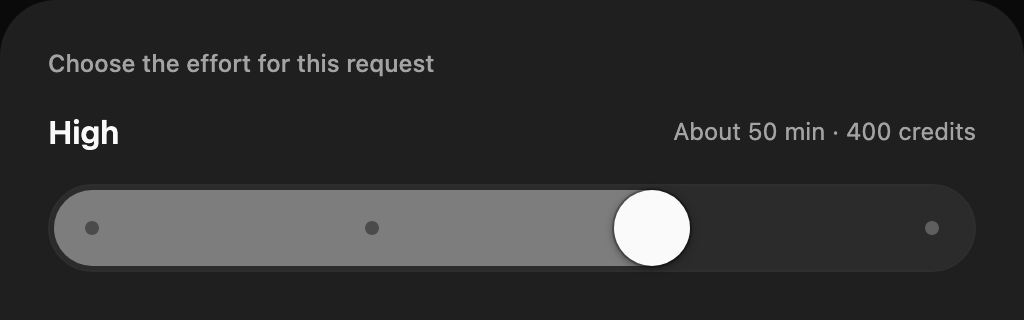
Plus and Pro provide more credits and access to more advanced AI. Compare the plans in Quests. Higher effort and paid plans do not guarantee a bug fix; playtest and describe the exact change you need.
Spending order
Credits are spent in this order: daily credits, plan credits, free rewards, purchased credits, then earned credits. Any credit pays for anything that costs credits. When you do not have enough, buy credits, earn them in Quests, get or upgrade a plan, or wait for your next credits.
Earn plan access and capacity
The Creator path offers temporary Plus and Pro for play milestones. It is not a recurring paid subscription. A milestone claimed while you already pay adds one weekly credit allowance instead of extra plan time.
Successful referrals give you and your friend 100 credits each to claim in Quests. You also get 1 game slot and 200 MB of storage, for up to 10 rewarded referrals. Read the reward rules before inviting someone.